Skip to content

desk.ly for Microsoft

Desk Sharing for your Microsoft environment

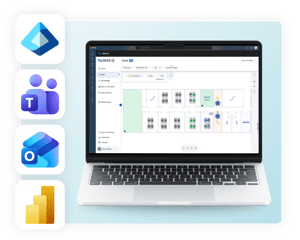
With desk.ly, you book desks, meeting rooms and parking spaces directly in Teams and Outlook. Your IT team manages access via Entra ID, and you analyse office occupancy in Power BI.
OMR Reviews Sternebewertung für desk.ly als Desk-Sharing-Software für Microsoft TeamsG2 Sternebewertung für desk.lyCapterra Sternebewertung für desk.ly
deskly_integration_in_microsoft_tools
Workstation Reservation System

Desk Sharing Integrated into Microsoft Teams

With desk.ly,youcan book andmanage workspaces, meeting rooms, and parking spots all in one place—with integration with Microsoft Teams, Outlook, and Entra ID.
Capterra, OMR Reviews, G2 Sternebewertungen

More than 1,000 companies worldwide trust desk.ly

Desk Booking integrated directly into Microsoft


The desk.ly integration for Microsoft connects the Workplace Management software desk.ly with Microsoft Teams, Outlook, Entra ID and Power BI.
Book without leaving Teams

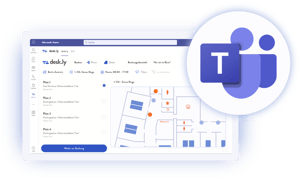
Book desks directly in Microsoft Teams

Your employees book desks, meeting rooms and parking spaces directly in Microsoft Teams. They see at a glance who from their team is in the office on which day. This way, teams plan their office days together without opening another tool.
deskly-microsoft-teams-integration.png
Plan meetings and rooms in one step

Calendar sync with Outlook

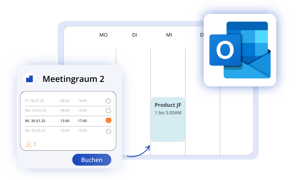
desk.ly integrates directly with your Microsoft Outlook calendar. Our integration syncs meeting room bookings with Outlook in real time. With the Outlook add-in, you can easily order catering, filter rooms by equipment and add guests.
deskly-outlook-calendar-synchronization.png
User management that stays up to date automatically

User Management with Integration into Entra ID

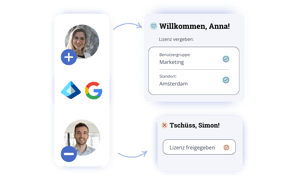
To easily manage users in desk.ly, you can synchronize your user identity information from your existing systems, e.g. from Entra ID. This saves you the manual effort of onboarding and offboarding and allows you to transfer rights and roles to desk.ly, e.g. to assign people to specific areas or prioritizations.

With SCIM integration ✔️
onundoffboarding-integration
Office occupancy in your own dashboards

desk.ly Insights integrated into Power BI

Via the RESTful API, your booking data flows into Power BI. There, you analyse office occupancy alongside your other company KPIs.
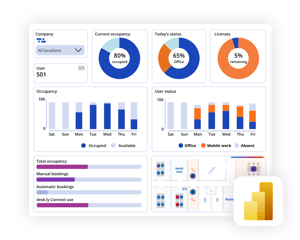
desk.ly insights in Power BI
Setup

Get started in Microsoft Teams in three steps

Your IT team installs the desk.ly app directly in the Teams admin center.

1
Add the app
In the Teams admin center, go to Teams apps, then search for and install the desk.ly app.
2
Grant Permissions
In the "Permissions" tab, grant consent for the whole organisation.
3
Get Started
Your employees sign in to the app and book their first desk.
✨ MCP interface coming soon

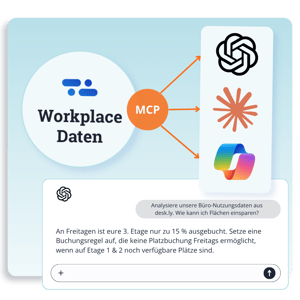
Analyse workplace data with AI

desk.ly is joining the MCP ecosystem, the standard adopted by major AI platforms such as ChatGPT, Claude and Microsoft Copilot. This lets you connect desk.ly data seamlessly to your AI workflows for faster analysis, without switching systems or exporting data manually. What this means for you:
Easy connection
Richer context in your analyses
Flexible workflows
Using the MCP interface, you can access desk.ly Workplace data directly within your AI system—such as ChatGPT, Claude, or Microsoft Copilot—for fast, context-rich analyses.
Security and service

Built for your IT requirements

ISO 27001 certified Our information security management system is certified to the international standard.  
GDPR-compliant desk.ly is hosted in Germany and meets the requirements of European data protection law.  
Personal support We support you personally from setup to rollout. You can reach our team via chat, phone and email.  

Frequently asked questions about the desk.ly Microsoft integration

What is the desk.ly integration for Microsoft?

The desk.ly integration for Microsoft connects the Workplace Management software desk.ly with Microsoft Teams, Outlook and Entra ID. Employees book desks, meeting rooms and parking spaces directly in the Microsoft tools they use every day. IT manages access centrally via Entra ID.
This creates more flexibility and better space utilisation, and supports hybrid working models. Depending on the company and industry, such systems are also called a desk booking system, hot desking software or desk reservation system.


How do I install the desk.ly app in Microsoft Teams?

Your IT team installs the desk.ly app in the Teams admin center under Teams apps. It then grants consent for the whole organisation in the "Permissions" tab. After that, all employees can sign in to the app.

Does desk.ly support single sign-on with Microsoft?

Yes, desk.ly automatically syncs user data from Microsoft Entra ID (formerly Azure AD). This means onboarding and offboarding happen without any manual effort.


Can desk.ly sync user data from Microsoft Entra ID?

Yes, desk.ly syncs your bookings with your Outlook calendar in real time. With the Outlook add-in, you can add catering, filter rooms by equipment and invite guests. Calendar sync is included in the Enterprise Plus plan.

Can I book meeting rooms in Outlook using desk.ly?

Yes, with the desk.ly Outlook add-in, you book meeting rooms directly while scheduling meetings in Outlook. desk.ly also syncs your bookings with your Outlook calendar in real time. Calendar sync is included in the Enterprise Plus plan.

Can I analyse desk.ly data in Power BI?

Yes, via the desk.ly RESTful API, booking data flows into your own Power BI dashboards. This lets you analyse office occupancy alongside other company KPIs. The RESTful API is included in the Enterprise Plus plan.

How much does desk.ly for Microsoft Teams cost?

desk.ly is a standalone tool and free for up to 15 users with no time limit. The Teams app and single sign-on are included from the Corporate plan upwards. You can find all plans and prices on the desk.ly pricing page.

Start shaping the future of hybrid work with desk.ly